OCAD Newsletter - May 2024 English Version | Deutsche Version weiter unten |
|
Grüezi XXXNAME With this newsletter, OCAD Inc. provides information about its current products, activities, projects, and events:
1. New Function: Define Paper Size |
|
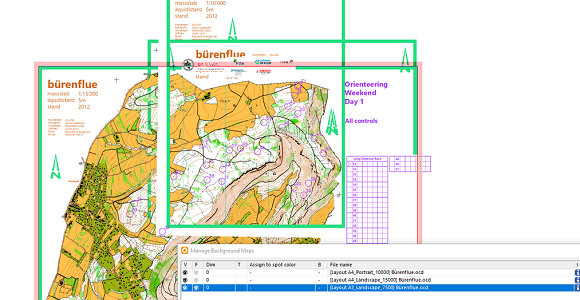
1. New Function: Define Paper Size With the last update, the Define Paper Size function was added to OCAD. The paper size is visible in the drawing area and the area outside is grayed out. This is useful for displaying a print area or creating a map layout.
|
|
2. How to Create a Layout? There are various ways to create a layout for a map in OCAD. Creating an appealing map layout quickly becomes a challenge and requires in-depth knowledge of OCAD. We have therefore compiled information and tips on the subject of creating map layouts in our OCAD Wiki.
|
|
3. Canvas: Video with Application Examples Nowadays, orienteering competitions often require different map scales and print areas adapted to the paper format. Depending on the print area, map and course elements must be placed differently, e.g. the map layout or the control description. With the Canvas function, different map layouts and scales can be managed in one single course setting project and PDFs of the courses can be exported with just one click. In this video, we give you an introduction to the Canvas function and show you possible applications using practical examples. Further information can also be found in the OCAD Wiki.
|
|
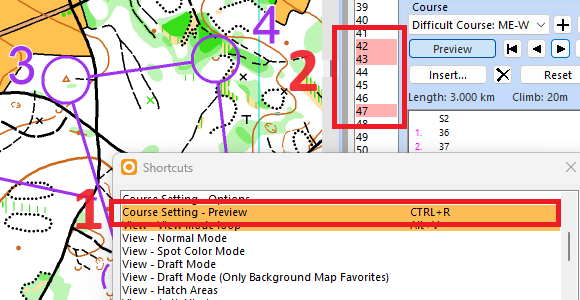
4. New Course Setting Features In the last OCAD Update, small but useful changes were added to the Course Setting Module, as you can read in this OCAD blog post.
- Default shortcut CTRL+R added for course preview (1)
|
|
5. ISMTBOM Symbol Sets Updated With the last OCAD update, the symbol sets for bike orienteering maps were adapted in accordance with the updated IOF specifications (ISMTBOM 2022, Revision 3, April 2024). The new symbol sets are valid from April 2024 and mandatory for IOF events from 1st January 2025. Existing bike orienteering maps can be adapted to the new symbol sets using the Update Symbol Set function.
|
|
6. OCAD Product Family |
|
OCAD Mapping Solution |
![]() |
|
|
OCAD Orienteering |
![]() |
|
|
OCAD Starter |
![]() |
|
|
OCAD Course Setting |
![]() |
|
|
*Prices without VAT. To order an OCAD License, please visit our Web Shop or contact your local reseller directly. |
|
For further questions about the software and services, do not hesitate to contact us (support@ocad.com). You may also visit our website: https://www.ocad.com. |
|
Kind regards You are receiving this e-mail because you have subscribed to OCAD Newsletter. |
|
Copyright OCAD AG |
OCAD Newsletter - Mai 2024 Deutsche Version | English Version above |
|
Grüezi XXXNAME Mit dem OCAD Newsletter informiert die OCAD AG über ihre Produkte, aktuellen Tätigkeiten, Projekte und Veranstaltungen:
1. Neue Funktion: Papierformat definieren |
|
1. Neue Funktion: Papierformat definieren Mit dem letzten Update wurde in OCAD die Funktion Papierformat definieren hinzugefügt. Die Papiergrösse ist in der Zeichenfläche sichtbar und der Bereich ausserhalb wird ausgegraut. Dies ist nützlich, um einen Druckbereich anzuzeigen oder ein Kartenlayout zu erstellen.
|
|
2. Wie wird ein Kartenlayout erstellt? In OCAD gibt es verschiedene Möglichkeiten ein Layout für eine Karte zu erstellen. Ein ansprechendes Kartenlayout zu erstellen wird schnell anspruchsvoll und erfordert fundiertes Wissen in OCAD. In unserem OCAD Wiki haben wir daher Informationen und Tipps rund um das Thema Kartenlayout erstellen zusammengetragen.
|
|
3. Canvas: Video mit Anwendungsbeispielen OL-Wettkämpfe verlangen heutzutage oft verschiedenen Kartenmassstäbe und dem Papierformat angepasste Druckbereiche. Je nach Druckbereich müssen Karten- und Bahnelemente unterschiedlich platziert werden, wie z.B. das Kartenlayout oder die Postenbeschreibung. Mit der Canvas Funktion können in einem Bahnlegungsprojekt verschiedene Kartenlayouts und Massstäben verwaltet und PDF‘s der Bahnen mit nur einem Klick exportiert werden. In diesem Video wird die Canvas Funktion vorgestellt und anhand von Praxis-Beispielen veranschaulicht. Weitere Informationen zur Canvas Funktion finden Sie im OCAD Wiki.
|
|
4. Neue Funktionen im Bahnlegungsmodul Im letzten OCAD-Update wurden kleine, aber nützliche Verbesserungen am Bahnlegungsmodul vorgenommen, wie Sie in diesem OCAD Blog Beitrag lesen können.
- Der Shortcut CTRL+R zeigt die Bahnvorschau (1).
|
|
5. ISMTBOM Symbolsätze aktualisiert Mit dem letzten OCAD-Update wurden die Symbolsätze für Bike-OL-Karten gemäss den aktualisierten Spezifikationen der IOF angepasst (ISMTBOM 2022, Revision 3, April 2024). Die neuen Symbolsätze sind gültig ab April 2024 und ab Januar 2025 für IOF Events verbindlich. Bestehende Bike-OL-Karten können mit der Funktion Symbolsatz aktualisieren den neuen Symbolsätzen angepasst werden.
|
|
6. OCAD Produktfamilie |
|
OCAD Mapping Solution |
![]() |
|
|
Ab CHF 500.- / Jahr * | Kaufen | Weitere Informationen |
|
|
OCAD Orienteering |
![]() |
|
|
Ab CHF 150.- / Jahr * | Kaufen | Weitere Informationen |
|
|
OCAD Starter |
![]() |
|
|
Ab CHF 75.- / Jahr * | Kaufen | Weitere Informationen |
|
|
OCAD Course Setting |
![]() |
|
|
Ab CHF 30.- / Jahr * | Kaufen | Weitere Informationen |
|
|
*Preise ohne Mehrwertsteuer. OCAD können Sie in unserem Web-Shop kaufen. |
|
Zögern Sie nicht, uns bei weiteren Fragen zu unserer Software und unseren Dienstleistungen zu kontaktieren (support@ocad.com). Weitere Informationen finden Sie auch auf unserer Website: |
|
Freundliche Grüsse Sie erhalten dieses E-Mail, weil Sie auf der Verteilerliste des OCAD Newsletter sind. |
|
Copyright OCAD AG |